🎉 Up to 70% Off Selected ItemsShop Sale
HomeStore

Solis S5 Wi-Fi Data Logger 4-Pin S5-WiFi-ST-4Pin Dual-Band 2.4GHz 5GHz Bluetooth BLE5 SolisCloud

Product image 1

Solis S5 Wi-Fi Data Logger 4-Pin S5-WiFi-ST-4Pin Dual-Band 2.4GHz 5GHz Bluetooth BLE5 SolisCloud

Solis S5 Wi-Fi Data Logger 4-Pin S5-WiFi-ST-4Pin Dual-Band 2.4GHz 5GHz Bluetooth BLE5 SolisCloud

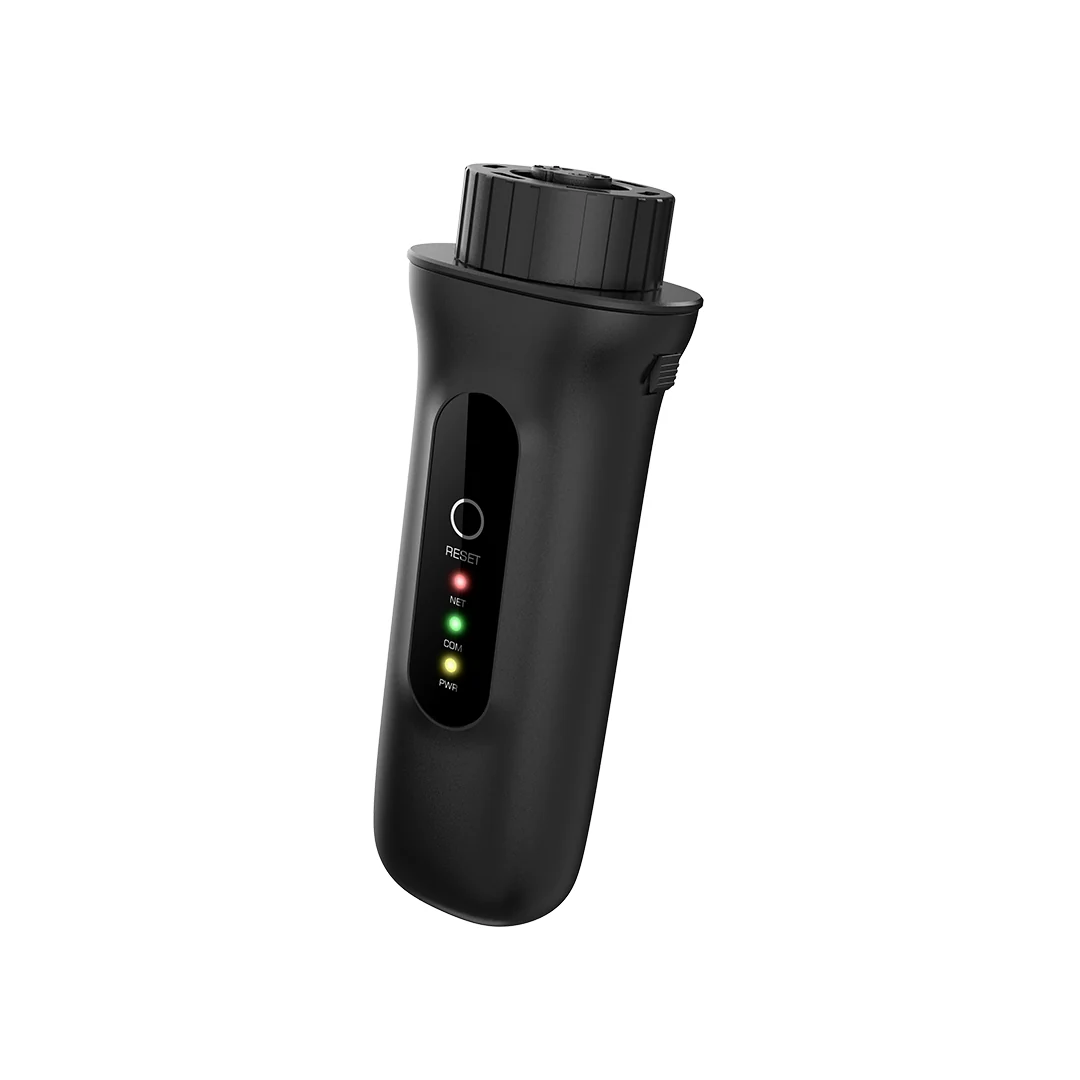
The Solis S5 Wi-Fi Data Logger (4-Pin) (model S5-WiFi-ST-4Pin) is a compact monitoring dongle for Solis 4G, 5G and S5 series inverters with a 4-pin COM port. It connects via your home Wi-Fi to SolisCloud and the SolisCloud app (iOS and Android), uploading performance data every 5 minutes for real-time monitoring, fault alerts and remote system management. Unlike earlier generations, the S5 supports both 2.4 GHz and 5 GHz Wi-Fi (802.11b/g/n and 802.11a/n), resolving connection failures caused by dual-band routers. Bluetooth BLE 5.0 enables local Wi-Fi configuration directly from the SolisCloud app. Supports up to 10 Solis inverters chained via RS485. IP65. Dimensions: 128 × 50 × 34 mm, 80 g. 2-year warranty.

Dual-Band
2.4+5 GHz
BLE 5.0
Bluetooth
10 inv.
Per Logger
5 min
Data Interval
IP65
Protection
2-Year
Warranty
ℹ 4-Pin COM port compatibility: Compatible with Solis 4G, 5G and S5 series (4-pin COM port). S6 series uses a USB port and needs a USB logger or adapter. Check the Solis compatibility guide for your specific model.
Key Features
Dual-Band Wi-Fi — 2.4 GHz and 5 GHz, Solves Router Compatibility Issues
A persistent problem with earlier single-band Wi-Fi dongles is connection failure when a router broadcasts a combined 2.4/5 GHz SSID (band steering). BT Hubs and modern ISP-supplied routers commonly do this, causing 2.4 GHz-only devices to attempt 5 GHz and fail. The S5 supports both 802.11b/g/n (2.4 GHz) and 802.11a/n (5 GHz), so it connects reliably regardless of router configuration. No need to split router bands or create a separate 2.4 GHz SSID.
2.4 GHz Wi-Fi5 GHz Wi-FiDual-band routers supported
Bluetooth BLE 5.0 — Local Configuration Without Network Access
Wi-Fi credentials are entered via the SolisCloud app over BLE 5.0. This eliminates the AP mode setup sequence of older dongles, where the phone must temporarily disconnect from its own Wi-Fi to join the dongle AP. BLE 5.0 provides faster pairing and more reliable local connections.
BLE 5.0No AP mode neededBluetooth Wi-Fi setup
Up to 10 Inverters on One Logger via RS485
Up to 10 Solis inverters can be chained via RS485 daisy-chain and monitored through a single S5 logger. Each inverter must have a unique RS485 address set on its display. All inverters appear as a single plant in the SolisCloud app.
Up to 10 invertersRS485 chainSingle logger/plant
Three LED Status Indicators — Fast On-Site Diagnosis
Three dedicated LEDs cover: power/device status, inverter (RS485) communication, and internet/server connection. Each shows: flashing (trying to connect), solid (connected), or off. This allows rapid diagnosis of whether a monitoring failure is Wi-Fi, server or inverter-side — without opening the app.
3 LEDsPower / RS485 / Internet
RESET Button — Immediate Data Push or Factory Reset
A short press triggers an immediate data upload to SolisCloud, confirming connectivity during commissioning. A long press (hold until all LEDs flash) performs a factory reset.
Short = data pushLong = factory reset
IP65 — Suitable for All Installation Environments
IP65 protection: dust-tight and water-jet resistant. Operating range −30°C to +65°C, up to 95% relative humidity. Compatible with outdoor, garage, loft and unheated enclosure locations.
IP65−30°C to +65°C95% RH
SolisCloud — Free Real-Time Monitoring and Remote Alerts
Data uploads every 5 minutes to SolisCloud. The platform and SolisCloud app (iOS and Android) provide: live power and yield, cumulative totals, fault notifications and (where supported) remote setting changes. Installer multi-site management is available for trade accounts. Standard residential monitoring is free.
Free monitoring5-min dataRemote alertsiOS + Android
Technical Specifications
Connectivity
Wi-Fi (2.4 GHz) 802.11b/g/n
Wi-Fi (5 GHz) 802.11a/n
Bluetooth BLE 5.0
Inverter Communication RS485 (Modbus RTU)
Data
Upload Interval 5 minutes
Platform SolisCloud
App SolisCloud (iOS and Android)
Multi-Inverter
Max Inverters per Logger 10 (RS485 daisy-chain)
Configuration
Wi-Fi Setup Bluetooth via SolisCloud app / browser (AP mode)
Power
Operating Voltage DC 5V (±5%)
Power Consumption ≤2 W
Physical
Dimensions (L×W×H) 128 × 50 × 34 mm
Weight 80 g
Indicators 3 × LED (power, RS485, internet)
Buttons 1 × RESET
Environment
Protection IP65
Operating Temperature −30°C to +65°C
Operating Humidity 5– 95% RH (non-condensing)
Storage Temperature −40°C to +70°C
Max Altitude 4,000 m
Compatibility
Compatible Inverters All Solis 4G, 5G and S5 series with 4-pin COM port
Not Compatible Solis S6 series (USB port — needs USB logger or 4-pin-to-USB adapter)
Warranty and Certification
Warranty 2 years
Certifications CE, FCC
Manufacturer Ginlong Technologies Co., Ltd (Solis)
Frequently Asked Questions
Which Solis inverters is the S5 (4-Pin) compatible with?
All Solis inverters with a 4-pin COM port: the 4G, 5G and S5 series. Newer S6 series inverters use a USB port and require a USB-type datalogger. A 4-pin to USB adapter is available from Solis to allow a USB logger to work with a 4-pin inverter. Check the official Solis compatibility guide for your specific model.
Why does the S5 support 5 GHz Wi-Fi?
Many modern ISP routers (BT Hub, Sky Hub, Virgin Media Hub) use band steering, broadcasting a single combined 2.4/5 GHz SSID. A 2.4 GHz-only dongle can be pushed to 5 GHz and fail to connect. Supporting both bands eliminates this without requiring router reconfiguration. Some ISPs (e.g. BT) require manually separating bands for older devices — this step is no longer needed with the S5.
Can I connect multiple Solis inverters to one data logger?
Yes, up to 10 inverters via RS485 daisy-chain. Connect RS485 cables between inverters in hand-in-hand sequence as described in the inverter manual. Each inverter must have a unique RS485 address set on its display. All inverters appear as one plant in SolisCloud.
How do I configure the Wi-Fi network?
Open the SolisCloud app and navigate to Service > Wi-Fi Configuration. Scan the logger QR code or enter its serial number. Select Configuration by Bluetooth and follow the prompts to choose your network and enter the password. Alternatively, use browser-based AP mode: ensure the green LED is flashing, connect your phone to the logger AP, and open the configuration page.
Is SolisCloud monitoring free?
Yes. Standard residential and most commercial monitoring via SolisCloud is free. No monthly subscription is required.
Related Products
Growatt ShineWiLan-X2
Three-in-one Wi-Fi + LAN + Bluetooth for Growatt inverters
SolaX Pocket WiFi V3.0
Cloud monitoring dongle for SolaX inverters
Growatt MIC 1000TL-X (AF)
1kW Growatt inverter with AFCI and DC switch
Projoy PEDS DC Isolator
DC isolator for array-level PV system safety
$33.08
Solis S5 Wi-Fi Data Logger 4-Pin S5-WiFi-ST-4Pin Dual-Band 2.4GHz 5GHz Bluetooth BLE5 SolisCloud
$33.08

Product Information

Shipping & Returns

Description

The Solis S5 Wi-Fi Data Logger (4-Pin) (model S5-WiFi-ST-4Pin) is a compact monitoring dongle for Solis 4G, 5G and S5 series inverters with a 4-pin COM port. It connects via your home Wi-Fi to SolisCloud and the SolisCloud app (iOS and Android), uploading performance data every 5 minutes for real-time monitoring, fault alerts and remote system management. Unlike earlier generations, the S5 supports both 2.4 GHz and 5 GHz Wi-Fi (802.11b/g/n and 802.11a/n), resolving connection failures caused by dual-band routers. Bluetooth BLE 5.0 enables local Wi-Fi configuration directly from the SolisCloud app. Supports up to 10 Solis inverters chained via RS485. IP65. Dimensions: 128 × 50 × 34 mm, 80 g. 2-year warranty.

Dual-Band
2.4+5 GHz
BLE 5.0
Bluetooth
10 inv.
Per Logger
5 min
Data Interval
IP65
Protection
2-Year
Warranty
ℹ 4-Pin COM port compatibility: Compatible with Solis 4G, 5G and S5 series (4-pin COM port). S6 series uses a USB port and needs a USB logger or adapter. Check the Solis compatibility guide for your specific model.
Key Features
Dual-Band Wi-Fi — 2.4 GHz and 5 GHz, Solves Router Compatibility Issues
A persistent problem with earlier single-band Wi-Fi dongles is connection failure when a router broadcasts a combined 2.4/5 GHz SSID (band steering). BT Hubs and modern ISP-supplied routers commonly do this, causing 2.4 GHz-only devices to attempt 5 GHz and fail. The S5 supports both 802.11b/g/n (2.4 GHz) and 802.11a/n (5 GHz), so it connects reliably regardless of router configuration. No need to split router bands or create a separate 2.4 GHz SSID.
2.4 GHz Wi-Fi5 GHz Wi-FiDual-band routers supported
Bluetooth BLE 5.0 — Local Configuration Without Network Access
Wi-Fi credentials are entered via the SolisCloud app over BLE 5.0. This eliminates the AP mode setup sequence of older dongles, where the phone must temporarily disconnect from its own Wi-Fi to join the dongle AP. BLE 5.0 provides faster pairing and more reliable local connections.
BLE 5.0No AP mode neededBluetooth Wi-Fi setup
Up to 10 Inverters on One Logger via RS485
Up to 10 Solis inverters can be chained via RS485 daisy-chain and monitored through a single S5 logger. Each inverter must have a unique RS485 address set on its display. All inverters appear as a single plant in the SolisCloud app.
Up to 10 invertersRS485 chainSingle logger/plant
Three LED Status Indicators — Fast On-Site Diagnosis
Three dedicated LEDs cover: power/device status, inverter (RS485) communication, and internet/server connection. Each shows: flashing (trying to connect), solid (connected), or off. This allows rapid diagnosis of whether a monitoring failure is Wi-Fi, server or inverter-side — without opening the app.
3 LEDsPower / RS485 / Internet
RESET Button — Immediate Data Push or Factory Reset
A short press triggers an immediate data upload to SolisCloud, confirming connectivity during commissioning. A long press (hold until all LEDs flash) performs a factory reset.
Short = data pushLong = factory reset
IP65 — Suitable for All Installation Environments
IP65 protection: dust-tight and water-jet resistant. Operating range −30°C to +65°C, up to 95% relative humidity. Compatible with outdoor, garage, loft and unheated enclosure locations.
IP65−30°C to +65°C95% RH
SolisCloud — Free Real-Time Monitoring and Remote Alerts
Data uploads every 5 minutes to SolisCloud. The platform and SolisCloud app (iOS and Android) provide: live power and yield, cumulative totals, fault notifications and (where supported) remote setting changes. Installer multi-site management is available for trade accounts. Standard residential monitoring is free.
Free monitoring5-min dataRemote alertsiOS + Android
Technical Specifications
Connectivity
Wi-Fi (2.4 GHz) 802.11b/g/n
Wi-Fi (5 GHz) 802.11a/n
Bluetooth BLE 5.0
Inverter Communication RS485 (Modbus RTU)
Data
Upload Interval 5 minutes
Platform SolisCloud
App SolisCloud (iOS and Android)
Multi-Inverter
Max Inverters per Logger 10 (RS485 daisy-chain)
Configuration
Wi-Fi Setup Bluetooth via SolisCloud app / browser (AP mode)
Power
Operating Voltage DC 5V (±5%)
Power Consumption ≤2 W
Physical
Dimensions (L×W×H) 128 × 50 × 34 mm
Weight 80 g
Indicators 3 × LED (power, RS485, internet)
Buttons 1 × RESET
Environment
Protection IP65
Operating Temperature −30°C to +65°C
Operating Humidity 5– 95% RH (non-condensing)
Storage Temperature −40°C to +70°C
Max Altitude 4,000 m
Compatibility
Compatible Inverters All Solis 4G, 5G and S5 series with 4-pin COM port
Not Compatible Solis S6 series (USB port — needs USB logger or 4-pin-to-USB adapter)
Warranty and Certification
Warranty 2 years
Certifications CE, FCC
Manufacturer Ginlong Technologies Co., Ltd (Solis)
Frequently Asked Questions
Which Solis inverters is the S5 (4-Pin) compatible with?
All Solis inverters with a 4-pin COM port: the 4G, 5G and S5 series. Newer S6 series inverters use a USB port and require a USB-type datalogger. A 4-pin to USB adapter is available from Solis to allow a USB logger to work with a 4-pin inverter. Check the official Solis compatibility guide for your specific model.
Why does the S5 support 5 GHz Wi-Fi?
Many modern ISP routers (BT Hub, Sky Hub, Virgin Media Hub) use band steering, broadcasting a single combined 2.4/5 GHz SSID. A 2.4 GHz-only dongle can be pushed to 5 GHz and fail to connect. Supporting both bands eliminates this without requiring router reconfiguration. Some ISPs (e.g. BT) require manually separating bands for older devices — this step is no longer needed with the S5.
Can I connect multiple Solis inverters to one data logger?
Yes, up to 10 inverters via RS485 daisy-chain. Connect RS485 cables between inverters in hand-in-hand sequence as described in the inverter manual. Each inverter must have a unique RS485 address set on its display. All inverters appear as one plant in SolisCloud.
How do I configure the Wi-Fi network?
Open the SolisCloud app and navigate to Service > Wi-Fi Configuration. Scan the logger QR code or enter its serial number. Select Configuration by Bluetooth and follow the prompts to choose your network and enter the password. Alternatively, use browser-based AP mode: ensure the green LED is flashing, connect your phone to the logger AP, and open the configuration page.
Is SolisCloud monitoring free?
Yes. Standard residential and most commercial monitoring via SolisCloud is free. No monthly subscription is required.
Related Products
Growatt ShineWiLan-X2
Three-in-one Wi-Fi + LAN + Bluetooth for Growatt inverters
SolaX Pocket WiFi V3.0
Cloud monitoring dongle for SolaX inverters
Growatt MIC 1000TL-X (AF)
1kW Growatt inverter with AFCI and DC switch
Projoy PEDS DC Isolator
DC isolator for array-level PV system safety